
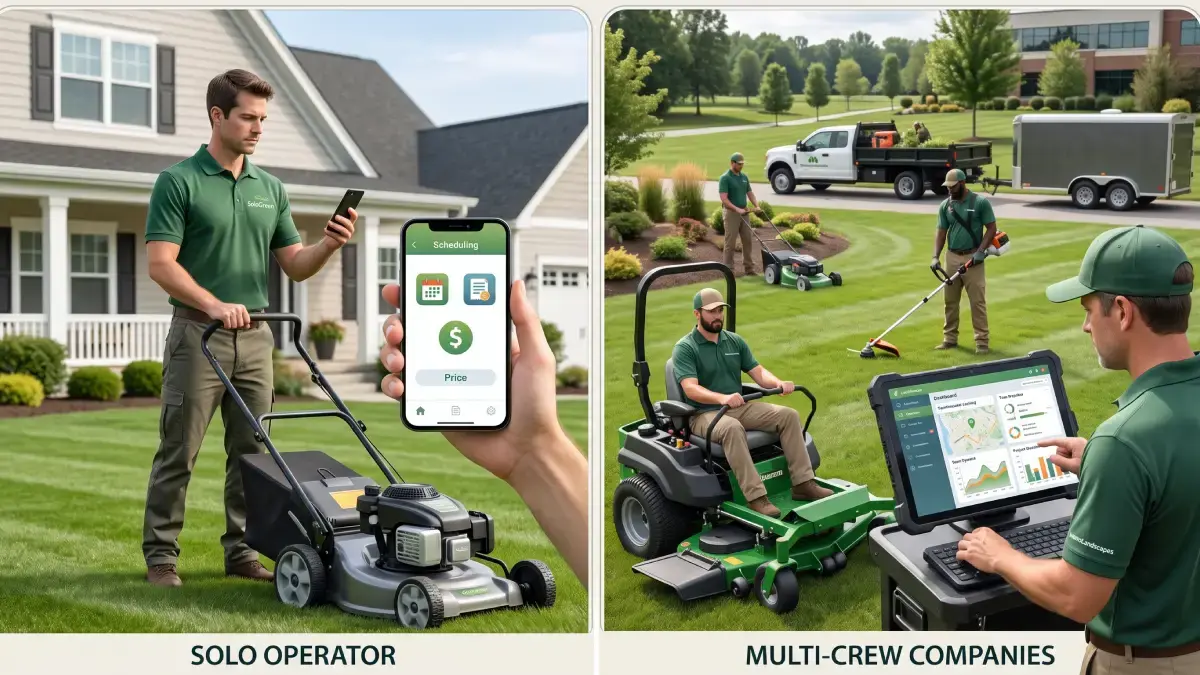
A solo lawn care operator can start with capable software for $0 to about $50 per month, while a multi-crew landscaping company should generally budget about $129 to $648 or more per month for stronger routing, job costing, automation, accounting connections, and additional team access. Those figures are not a universal market average; they are a practical buying range derived from the published September 2026 prices of Yardbook, LawnPro, Service Autopilot, and LMN.
The important distinction is not simply company size. The right budget depends on how many people need logins, whether the company runs recurring routes, which office workflows need automation, and whether the owner needs basic scheduling or detailed job-profitability data.
Pricing note: Software vendors can change plan names, prices, included users, and add-ons without notice. Confirm the current total directly with the vendor before subscribing.
Pricing at a glance
The table below compares representative published plans rather than claiming that every platform fits every business. It shows why a free or inexpensive product may work well for an owner-operator, while a company coordinating several crews may need a substantially larger software budget.
Business stage | Practical monthly budget | What that budget commonly covers | Representative options |
|---|---|---|---|
Solo operator testing software | $0 | CRM, scheduling, estimates, invoices, payments, mobile access, with limits that vary by product | LawnPro Solo; Yardbook Starter |
Solo operator needing fewer limits | $35–$50 | More customers, recurring billing, basic team capacity, or additional operational tools | Yardbook Business; LawnPro Startup; Service Autopilot Startup |
Small crew | $129–$297 | More employee logins, optimized routes, time tracking, job forms, or landscaping-specific estimating | LawnPro Grow; LMN Starter |
Established multi-crew company | $199–$648+ | Route optimization, job costing, automations, more field licenses, deeper reporting, or advanced estimating | Service Autopilot Pro/Pro Plus; LMN Professional |
These ranges are starting points. Payment processing, texting, onboarding, premium support, accounting software, data migration, and extra user licenses can increase the actual first-year cost.
Why team structure changes cost
Software pricing rarely scales according to trucks alone. Vendors may charge by plan, employee login, office user, mobile license, crew-lead seat, feature bundle, or a combination of those units.
A solo operator usually plays every role: estimator, scheduler, technician, invoice clerk, and owner. One login and a lightweight feature set may therefore cover the entire workflow. A multi-crew company may need office access for a dispatcher, full access for managers or crew leads, restricted mobile access for technicians, and reporting for the owner.
That difference changes both the subscription tier and the required features. Multi-crew businesses usually gain more value from route optimization, crew calendars, time tracking by property, job costing, GPS verification, forms, automated reminders, and accounting synchronization than a solo operator does.
Solo operator costs
A realistic budget
For a solo lawn care operator, a reasonable starting budget is $0 to $50 per month. Free plans can cover the basics, while a modest paid plan may remove customer limits, improve communication, or create room for the first employee.
Yardbook advertises a free option for managing customers, schedules, and billing, with Business at $34.99 per month and Enterprise at $49.99 per month. The higher levels add capabilities such as GPS tracking, multi-step programs, QuickBooks synchronization, and an ad-free experience.
LawnPro also offers a free Solo plan, but it is limited to one user and 25 customers. Its $39-per-month Startup plan supports three employee logins and unlimited customers and properties, making it a more natural bridge between an owner-operator setup and a very small team.
Service Autopilot starts at $49 per month on annual subscription rates and adds a sign-up fee. That Startup tier includes scheduling and dispatch, invoicing, integrated payments, expense tracking, and customer and lead management, but buyers should account for the undisclosed sign-up cost before comparing it with a flat monthly plan.
When free software is enough
Free software can be sufficient when one person handles a manageable customer list, creates straightforward estimates, schedules recurring mowing visits, and sends basic invoices. At this stage, the goal is usually to replace paper, text-message threads, and disconnected spreadsheets not to build a complex operations system.
A free plan becomes less attractive when its customer cap, automation limits, routing tools, reporting, or accounting workflow creates recurring administrative work. The subscription price may be zero while the owner still pays through extra evenings spent reorganizing routes, chasing invoices, or entering the same information twice.
Best features for a solo operator
Prioritize the functions that save time immediately:
Recurring job scheduling for weekly and biweekly services
Fast estimates that can become jobs without duplicate entry
Invoicing and online payments
A mobile calendar with customer and property notes
Simple route planning
Before-and-after photos
Expense and time tracking
Easy data export in case the business later changes platforms
Advanced dashboards and complex automation are less important if the owner has only a few daily stops. Buying software for an imagined future can create unnecessary cost and setup work.
Multi-crew company costs
A realistic budget
A small or midsize multi-crew landscaping business should expect a much wider range: roughly $129 to $648 or more per month, before payment fees, onboarding, optional modules, and extra licenses. The lower end can serve a growing crew with packaged employee access; the upper end buys more advanced estimating, job costing, automation, analytics, and operational control.
LawnPro Grow costs $129 per month and includes seven employee logins. It adds optimized routes and route analytics, job forms, advanced time tracking, bulk scheduling, review-request automations, and multi-step chemical programs. LawnPro Plus costs $249 per month for 15 employee logins and adds two-way texting, automatic card charging, and QuickBooks synchronization.
Service Autopilot publishes annual-subscription rates of $199 per month for Pro and $499 per month for Pro Plus, with a sign-up fee on both. Pro includes multi-day job management, route optimization, a dispatch calendar, job costing, employee tracking, and customized reporting; Pro Plus adds automation workflows and includes five mobile licenses plus one business-user license.
LMN sits at the higher end of this sample. Starter begins at $297 per month and includes one office or crew-lead license plus five crew-member licenses. Professional begins at $648 per month and includes three office or crew-lead licenses plus 15 crew-member licenses; both are subject to a one-time onboarding fee, and additional licenses cost extra.
What multi-crew companies pay for
The jump in price should buy operational leverage, not merely more logins. Features worth paying for include:
Route optimization across several crews and service areas
Drag-and-drop dispatching and crew reassignment
Time tracking by employee, property, and job
Estimated-versus-actual labor reporting
Material, equipment, and subcontractor costing
Crew notes, photos, forms, and proof of service
Automated recurring invoices and overdue-payment reminders
Permissions that separate field, crew-lead, office, and owner access
QuickBooks or other accounting integrations
Chemical-application records and multi-step treatment programs
Multi-location reporting where relevant
A platform that saves a dispatcher time but gives the owner no view of job profitability may solve only half the problem. Conversely, sophisticated job-costing software may be excessive for a mowing company whose primary challenge is simply sequencing recurring stops.
Published plan examples
Platform and plan | Published monthly price | Included capacity | Notable fit |
|---|---|---|---|
Yardbook Starter | $0 | Vendor does not show a user limit in the cited pricing summary | Solo operators needing basic customer, scheduling, and billing tools |
Yardbook Business | $34.99 | Flat plan details should be confirmed with vendor | Small operators wanting GPS tracking and customer-engagement tools |
Yardbook Enterprise | $49.99 | Flat plan details should be confirmed with vendor | Businesses needing QuickBooks sync and no ads |
LawnPro Solo | $0 | 1 user; up to 25 customers | New solo lawn businesses with a small client base |
LawnPro Startup | $39 | 3 employee logins; unlimited customers and properties | Solo owners hiring their first workers |
LawnPro Grow | $129 | 7 employee logins | Small crews needing optimized routes and advanced time tracking |
LawnPro Plus | $249 | 15 employee logins | Larger teams needing texting, card-on-file charging, and QuickBooks sync |
Service Autopilot Startup | $49 + sign-up fee | 1 business user; 1 mobile license | Small service business needing core scheduling and invoicing |
Service Autopilot Pro | $199 + sign-up fee | 1 business user; 2 mobile licenses | Multi-crew operation needing routing, dispatch, and job costing |
Service Autopilot Pro Plus | $499 + sign-up fee | 1 business user; 5 mobile licenses | Businesses ready to invest in workflow automation |
LMN Starter | $297 + onboarding | 1 office/crew-lead license; 5 crew-member licenses | Landscape contractors prioritizing budgeting and estimating |
LMN Professional | $648 + onboarding | 3 office/crew-lead licenses; 15 crew-member licenses | Established companies needing real-time job costing and deeper operations tools |
The least expensive plan is not automatically the best value. Compare the plan that contains the required features and enough user access not the vendor’s lowest advertised price.
For a broader assessment of scheduling, routing, estimating, and crew-management options, compare the platforms in the FieldTech Reviews guide to the best landscaping software. The guide is organized around the operational needs of landscaping and lawn care businesses rather than price alone.
Costs beyond the subscription
Additional users
Ask the vendor to define every user type in writing. An “employee,” “mobile user,” “office user,” and “crew-lead license” may not carry the same permissions or price.
Build the quote around the actual access map: owner, estimator, dispatcher, bookkeeper, crew leads, field technicians, and seasonal workers. A cheap base plan can become expensive when every technician requires a paid seat, while a higher flat-rate plan may become more economical as headcount grows.
Onboarding and migration
Setup may include an onboarding fee, data import, training, custom forms, service-list configuration, and accounting integration. LMN states that its published plans apply after a one-time onboarding fee, while Service Autopilot displays a sign-up fee without publishing the amount on the pricing page reviewed.
Even when a vendor charges no formal onboarding fee, internal setup still has a cost. Someone must clean customer records, define services and prices, configure recurring jobs, test invoices, create permissions, and train crews.
Payment processing
Online payments can improve collection speed, but transaction charges may exceed the subscription for companies processing substantial card volume. Request the card, ACH, chargeback, refund, and instant-deposit rates before estimating the total cost.
Compare payment fees separately from software fees. A platform with a slightly higher subscription but lower processing costs may produce a lower total cost for a company that collects most revenue online.
Texting and communication
Two-way texting, bulk messages, review requests, and automated appointment reminders may be included only in higher tiers or sold as add-ons. LMN, for example, lists SMS customer messaging as a $75 one-time fee plus $30 per month, while LawnPro includes two-way texting in Plus and shows it as an add-on for lower plans.
Accounting and other integrations
Confirm whether an advertised integration is one-way or two-way, which plan unlocks it, and whether it carries an extra charge. Also check whether the sync covers customers, invoices, payments, products, taxes, classes, payroll, and expenses or only a subset.
Solo vs multi-crew decision
Question | Solo operator priority | Multi-crew priority |
|---|---|---|
How many users need access? | Usually one full user | Office staff, managers, crew leads, and technicians may need different access |
What scheduling is required? | Recurring personal calendar | Crew capacity, dispatching, reassignment, and absence coverage |
How important is routing? | Basic stop ordering may be enough | Route optimization can affect every crew’s daily productivity |
What reporting is needed? | Revenue, expenses, and unpaid invoices | Labor efficiency, route performance, and estimated-versus-actual job cost |
How much automation is useful? | Invoice reminders and recurring jobs | Multi-step workflows across sales, dispatch, field work, billing, and follow-up |
How complex is implementation? | Often self-serve | May require migration, permissions, training, and staged rollout |
A solo operator should usually buy for today plus the next employee not for a hypothetical 20-person company. A multi-crew business should map workflows and permissions before requesting quotes, because changing platforms after every crew depends on the system is far more disruptive.
How to calculate total cost
Use a 12-month ownership estimate instead of comparing headline prices:
First-year cost = subscription + user licenses + onboarding + add-ons + payment fees + migration and training time
For each finalist, request a written quote that answers these questions:
Is the advertised rate monthly, annualized, or prepaid annually?
How many office, crew-lead, and mobile users are included?
What does each extra user cost?
Are seasonal licenses available?
Which routing, automation, and reporting features require a higher tier?
Is onboarding mandatory, and what does it include?
What are the card and ACH processing rates?
Is texting included, metered, or sold separately?
Does accounting synchronization cost extra?
What happens to pricing at the next headcount milestone?
Can data be exported in a usable format?
Does renewal pricing differ from the introductory rate?
This approach prevents a common buying mistake: selecting a low advertised entry price and discovering later that the required team access or workflow sits two tiers higher.
Which budget fits?
Choose $0–$50 per month when
One person performs most office and field work
The customer list is small or the free plan has adequate capacity
Basic recurring scheduling and invoicing solve the main problem
Route complexity is limited
Advanced job costing is not yet necessary
The owner is comfortable with self-service setup
Choose $129–$297 per month when
Several employees need logins
More than one crew or route must be coordinated
Optimized routing and property-level time tracking matter
The business needs better forms, automation, or accounting connectivity
The owner wants clearer production and profitability data
Prepare for $499–$648+ per month when
Several office and field roles need structured access
Workflow automation is central to the buying decision
Detailed estimating and real-time job costing affect margins
The company has many employees, locations, departments, or seasonal workers
Onboarding and operational standardization are part of the project
Before choosing a tier, use the best landscaping and lawn care software comparison to create a shortlist based on workflow. Price should break a tie between suitable systems, not compensate for missing operational features.
Final recommendation
A solo operator should begin with the least complicated plan that handles recurring scheduling, customer records, estimates, and invoices reliably. Free tools can be a rational choice, especially while the owner is still learning which workflows deserve automation.
A multi-crew company should focus less on the starting price and more on cost per productive crew, dispatch efficiency, labor visibility, and job-margin control. The best purchase is the platform that removes enough administrative work and operational leakage to justify its complete first-year cost not simply the one with the lowest monthly number.