
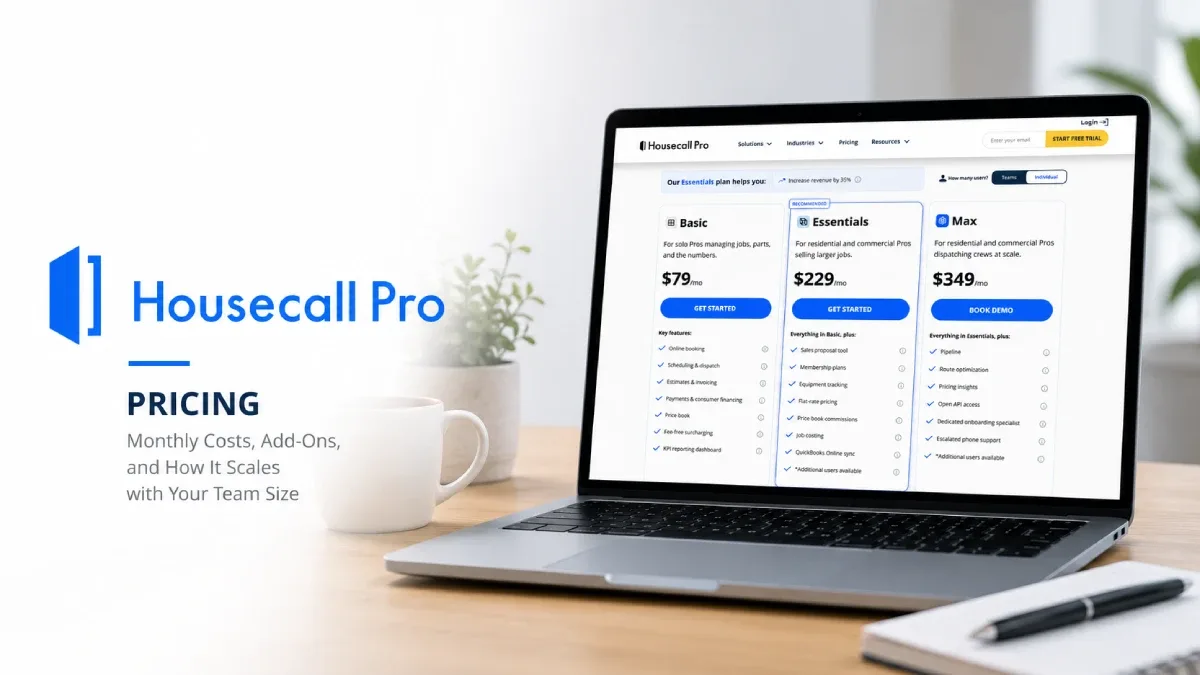
Housecall Pro is an all‑in‑one platform for home‑service and HVAC businesses, combining scheduling, dispatching, estimates, invoicing, payments, and marketing tools in one system. The pricing page looks simple three plans and a free trial, but the real cost depends on which tier you choose and how many techs you run.
Using Housecall Pro’s HVAC pricing screenshots, this guide breaks down the current Basic, Essentials, and Max plans, their monthly prices, key add‑ons, and how those costs scale as you grow from “just me” to a full crew.
Internal links to add near the top:
In‑depth review: Housecall Pro review on FieldTech Reviews
Trade hub: Best HVAC software
Comparison: Housecall Pro vs Jobber
Plan overview: Basic, Essentials and Max
On the HVAC‑specific pricing page, Housecall Pro presents three plans, all with a 14‑day free trial and a toggle for monthly vs annual billing:
Basic – $79/month
For solo pros managing jobs, parts and basic payments.Essentials – $229–$299/month
For residential and commercial HVAC teams ready to grow and automate more of the workflow.Max – $349–$649/month
For larger operations and established Pros needing deeper reporting, support, and sales tools.
Note: the exact Essentials and Max numbers vary slightly between screenshots (e.g., $229 vs $299; $349 vs $649) because Housecall Pro runs industry‑specific pricing and promotions. Across sources, public pricing generally ranges from $79/month for Basic up to the low‑to‑mid $600s for Max, depending on billing and packages.
All plans include core features like job management, estimates, online booking, and card payments, but higher tiers unlock more automation, reporting, and sales tooling.
Basic plan ($79/month): starting point for solo pros
The Basic plan is the entry tier, shown at $79/month on the HVAC pricing page.
It’s designed for:
Solo HVAC or home‑service pros
Very small operations where the owner handles scheduling, dispatch and billing personally
Typical Basic‑level features include:
Scheduling and job management
Estimates and invoices
Customer database
Online booking and simple reminders
Basic card payments through Housecall Pro
Limitations to keep in mind:
Basic doesn’t include some advanced tools (like deeper reporting, sales proposal tools, or more complex automation) that Essentials and Max layers on.[
Many growing teams end up outgrowing Basic once they add multiple techs or want tighter QuickBooks and marketing workflows.
Internal link: in this section, send readers to your Housecall Pro review for a feature‑by‑feature breakdown and to Housecall Pro vs Jobber if they’re still deciding between entry‑level options.
Essentials plan (~$229–$299/month): automation for growing teams
The Essentials plan is highlighted as the “Essentials plan helps you…” and sits in the middle at around $229–$299/month in your screenshots. It’s aimed at HVAC companies with multiple techs and office staff who need more automation and insight than Basic provides.
Key upgrades over Basic usually include:
More advanced dispatching and scheduling – better tools for managing multiple techs and daily routes.
KPI dashboard and reporting – visibility into revenue, job counts, and performance.
Sales proposal and membership tools – e.g., a sales proposal tool, maintenance/membership plan management, and recurring services.
Deeper “pricing insights” – tools to help you track job profitability and optimize pricing.
On the HVAC pricing page, a section titled “Key features for your business” appears under the plans, showing modules like KPI Dashboard, Sales Proposal Tool, Membership plan, AI Pricing Insights as part of the value proposition.
For many HVAC shops, Essentials is the real starting point: it costs more, but it’s built for multi‑tech teams that want repeatable processes, not just digital paperwork.
Internal link: from this section, link up to Best HVAC software so readers can see how Essentials compares to other “mid‑tier” platforms like Jobber and ServiceTitan.
Max plan (roughly $349–$649/month): scaling and advanced support
The Max plan is the top tier, with pricing in your screenshots ranging from $349/month on one HVAC page to $649/month on another, again reflecting industry‑specific bundles and promotions.
Max is built for:
Larger HVAC and home‑service operations
Multi‑crew teams with dedicated office staff and an active sales pipeline
Companies that want more hands‑on support and advanced tooling
Max typically adds on top of Essentials:
More advanced reporting and KPI tracking for management
Higher limits or extra capacity for memberships and recurring revenue programs
Priority or dedicated onboarding and support
Additional sales and pricing tools aimed at maximizing ticket size and margins
If you already run multiple install and service crews, or you’re actively scaling with marketing and memberships, Max is where Housecall Pro becomes a growth platform rather than just a job management tool.
Internal link: use your Housecall Pro vs Jobber comparison page from this section to show where Max sits relative to Jobber’s Plus/Scale tiers.
Add‑ons: answering, AI, and growth tools on top of your base plan
Below the pricing table, Housecall Pro promotes add‑ons to “grow your business,” such as call answering so you “never miss another call,” as well as CRM and automation components.
Common add‑ons include (exact prices can vary):
Call answering / AI assistant – taking calls, booking jobs, and filtering leads when your team is in the field, often priced per seat or per call.
Marketing and review tools – campaigns, referral tracking, and review requests.
Other industry‑specific extras for memberships or advanced analytics.
These are billed on top of your core Basic/Essentials/Max subscription, so your real monthly cost becomes:
Base plan (Basic / Essentials / Max)
When you model cost, treat add‑ons and processing fees as separate line items so you can decide whether they pay for themselves in saved admin time or added bookings.
How Housecall Pro pricing scales with your team size
While the HVAC pricing page doesn’t show per‑user charts directly, Housecall Pro’s broader pricing structure is tuned to team size:
Solo or very small shops can start on Basic at $79/month, but many quickly jump to Essentials once they add a dispatcher or second tech.
Growing teams (3–10 techs) usually end up on Essentials, where the extra monthly cost is offset by better dispatching, reporting, and membership revenue.
Larger operations with multiple crews, aggressive memberships, and active sales teams are the best fit for Max, where more advanced reporting, pricing tools and support prevent revenue leakage at scale.
The key is to match the plan to your current headcount and process complexity:
If you’re mainly losing time to manual quoting and invoicing, Basic might be enough.
If you’re losing time to dispatch chaos and lack of visibility, Essentials is the better fit.
If you’re losing money on untracked memberships, poor pricing, or lack of insight across many crews, Max typically pays for itself.
Internal links: remind readers they can cross‑check fit in your Housecall Pro review, HVAC trade hub, and Housecall Pro vs Jobber comparison: