
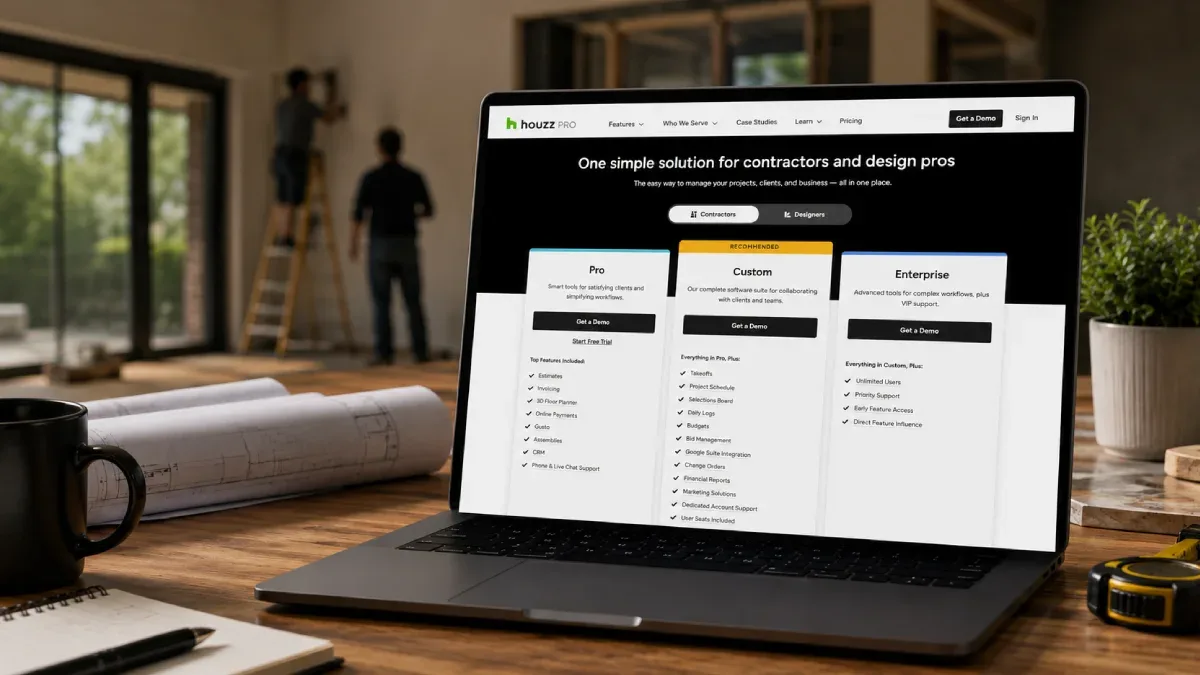
Houzz Pro is an all‑in‑one platform built for contractors, remodelers, specialty builders and design pros who need marketing, CRM, estimating, project management and client communication in one place. Instead of stitching together separate tools for ads, leads, proposals and schedules, Houzz Pro offers a single stack that can handle lead generation, client management and job delivery from inquiry through final invoice.
For contractors, the real question is what you pay for that stack. Houzz Pro’s pricing is organized into plan tiers with different feature bundles, plus optional advertising packages. The company emphasizes that the cost depends on which plan you choose and the type of work you do, so contractors should focus on understanding what each tier includes rather than looking for a single flat rate.
Internal links to use near the top:
Deep dive: Houzz Pro review
Comparison: Housecall Pro vs Houzz Pro
Alternatives: Best general contractor software
Houzz Pro plan tiers for contractors
On the contractor pricing page, Houzz Pro presents three main plans (with a toggle for “Contractors” vs “Designers”):
Essential – key features for managing projects and delighting clients.
Custom (recommended) – a configurable software suite for collaborating with clients and teams.
Enterprise – advanced tools for complex workflows plus VIP support.
Each plan includes different bundles from Houzz Pro’s platform categories: planning tools (3D floor plans, takeoffs, contracts, bid management), financial suite (estimates, proposals, invoices, online payments, financial reports), project management (schedule, tasks, logs, time and expense tracking), and marketing (custom website, email marketing, premium profile, targeted advertising, lead generation).
Houzz’s FAQ section reinforces that pricing differs by plan and business type: “The cost of Houzz Pro depends on which plan you choose. We have affordable options available for every business.” That means a small remodeling contractor buying Essential will pay differently than a larger firm choosing Custom or Enterprise with advertising add‑ons.
Essential plan: baseline CRM, estimating and project tools
The Essential package focuses on the core functions contractors need to manage jobs and client relationships.
Typical Essential‑level features include:
Project and client management (CRM, mood boards, selections).
Estimates and proposals.
Contracts and change orders.
Invoices and online payments.
Basic schedule and task tracking.
Client communication tools and live chat support.
For many small general‑contractor or remodeling businesses, Essential is the entry point into Houzz Pro’s ecosystem. You’re paying primarily for:
Having your CRM, estimates and invoices in one system.
Moving away from manual spreadsheets and separate proposal tools.
Using a simple project workspace to keep client selections and documents together.
If your current pain points revolve around inconsistent estimates, lost client information, and scattered documents, Essential may provide enough functionality to justify its subscription cost without adding heavy marketing spend yet.
Internal link: from this section, send readers to your Houzz Pro review for detailed feature breakdowns.
Custom plan: integrated marketing, CRM and collaboration
The Custom plan is labeled “Recommended” on the contractor pricing page, indicating Houzz sees it as the default choice for many builders and remodelers.
Custom includes everything in Essential plus additional tools such as:
Deeper collaboration features for teams and clients (client dashboard, subcontractor dashboard).
More advanced scheduling and task management.
Enhanced reporting and financial tools.
Access to more robust marketing capabilities within the platform.
In practice, Custom is where marketing costs begin to matter more. Contractors at this level are likely to use Houzz Pro not just as a job file but as a lead and reputation engine, which may involve:
A custom website hosted on Houzz Pro.
Email marketing campaigns.
A premium profile on Houzz’s consumer marketplace.
Targeted advertising to homeowners.
Lead generation tools that push inquiries directly into the CRM.
When you choose Custom, you’re paying for a combined stack: CRM + estimating + project management + marketing. The value is highest when you actively use the marketing and collaboration tools to keep the pipeline full and projects smoother, not just when you use it as a fancy contact list.
Internal links: this is a good place to point readers to Housecall Pro vs Houzz Pro so they can compare “operations‑first” vs “marketing‑plus‑operations” stacks.
Enterprise plan: complex workflows and VIP support
The Enterprise tier is pitched to larger or more complex contractors who need advanced workflows and dedicated support.
Enterprise adds on top of Custom:
More advanced project and portfolio tools.
Higher‑level reporting and financial controls.
Additional integrations and support options.
VIP support (white‑glove onboarding and service).
For a smaller GC, Enterprise may be more than necessary. For larger firms managing multiple concurrent projects, designers, subcontractors, and client stakeholders, Enterprise can be attractive if they want one system to standardize estimating, scheduling, client communication, selections, and marketing across the whole business.
Because Enterprise involves more configuration, it’s particularly important to get a clear pricing proposal that explains:
Base subscription cost.
Any per‑user, per‑project or per‑seat pricing.
Advertising or lead‑generation costs.
Onboarding and support fees.
Internal link: from this section, link to Best general contractor software so readers can compare Houzz Pro Enterprise to other high‑end platforms.
Advertising packages: separate marketing spend on top of your plan
Under the plan cards, Houzz Pro offers an “Add an Advertising Package” option. This is a separate marketing spend on top of your Essential/Custom/Enterprise subscription, aimed at promoting contractors to homeowners on Houzz’s consumer platform.
Advertising packages typically include:
Promoted placement and visibility in Houzz’s directory.
Targeted ads that show your business to relevant homeowners.
Integration with your Houzz Pro profile and CRM so leads flow into your system.
Because advertising spend is independent of software licensing, contractors should treat it as a marketing budget line item, not just part of the SaaS fee. Ask:
How much does a given package cost per month?
How many impressions or leads can you reasonably expect?
How are leads reported in Houzz Pro (source tracking, ROI reports)?
Are contracts flexible or locked into long terms?
If ads are effective in your region and trade, paying Houzz Pro for marketing plus CRM and estimating can be powerful. If not, you may prefer to keep your Houzz Pro usage focused on project and client management while testing other marketing channels.
Free plan and ROI calculator
Houzz Pro offers a Free Houzz Pro plan for getting started and exploring tools at no cost. This free tier has limited features but can help contractors test basic workflows before upgrading to a paid plan.
The pricing page also highlights an ROI calculator that estimates potential annual revenue increase based on Houzz Pro usage and advertising. The sample card shows:
A potential annual revenue increase figure.
A percentage increase.
Revenue from additional projects.
Revenue from project upcharges.
These are illustrative numbers, and Houzz labels them as example figures. Contractors should treat the calculator as a high‑level planning tool, not a promise. It’s useful for:
Stress‑testing whether your average job value and closing rate can justify the marketing and software spend.
Visualizing what happens to revenue if you win a handful of extra projects per year via Houzz leads.
Starting internal discussions about how many jobs you need to close to make Houzz Pro “pay for itself.”
How Houzz Pro combines marketing, CRM and estimating in one stack
Houzz Pro’s value proposition for contractors is that marketing, CRM, estimating and project management live in a single system.
From the “All‑In‑One Platform for Construction and Design” menu, you can see how the stack fits together:
Planning: 3D floor plans, takeoffs, contracts, bid management, product library, selections, CRM, mood boards.
Financial suite: estimates, proposals, change orders, invoices, online payments, financial reports, QuickBooks integration, homeowner financing.
Project management: schedule, task management, daily logs, procurement, time and expense tracking, client and subcontractor dashboards.
Marketing: custom website, email marketing, premium profile, targeted advertising, lead generation.
For contractors who currently juggle separate tools for each category—one for ads, another for proposals, another for schedules—Houzz Pro can centralize operations. The pricing question then becomes: is it cheaper and more effective to buy one integrated stack or keep managing multiple point solutions?
Budgeting for Houzz Pro as a contractor
Because Houzz Pro’s FAQ emphasizes that “the cost depends on which plan you choose” and offers “different plan types” for various businesses, contractors should build a simple budgeting model before signing.
Key steps:
Clarify the base plan price.
Get written numbers for Essential, Custom or Enterprise, including any differences for monthly vs annual billing.Clarify user and project assumptions.
Ask whether prices depend on seats, projects or business size.Separate software from advertising.
Treat Houzz Pro marketing packages as a distinct budget line, measured against closed jobs, not just clicks.Map features to real bottlenecks.
Tie each paid feature (like takeoffs, 3D, selections, email campaigns, lead generation) to a concrete problem it solves—time saved, errors avoided, jobs won.Compare with alternatives.
Use your Housecall Pro vs Houzz Pro page and Best general contractor software guide to see if another platform gives similar functionality at a lower or clearer price.