
Workiz is field service management software built for home-service businesses, including plumbing, electrical, HVAC, appliance repair, locksmith, and garage-door companies. It combines scheduling, dispatching, estimating, invoicing, payments, client communication, reporting, and automation in one platform.
For plumbers and electricians, Workiz can be appealing because it supports the full workflow: capture a lead, schedule the job, dispatch a technician, create an estimate, collect payment, and follow up afterward. But before choosing it, you need to understand that Workiz pricing is not always a simple fixed monthly cost. Your total can depend on the plan, business size, feature usage, communication tools, automations, payment services, and optional AI products.
For a complete review of the platform’s strengths and limitations, see our Workiz review.
How Workiz pricing works
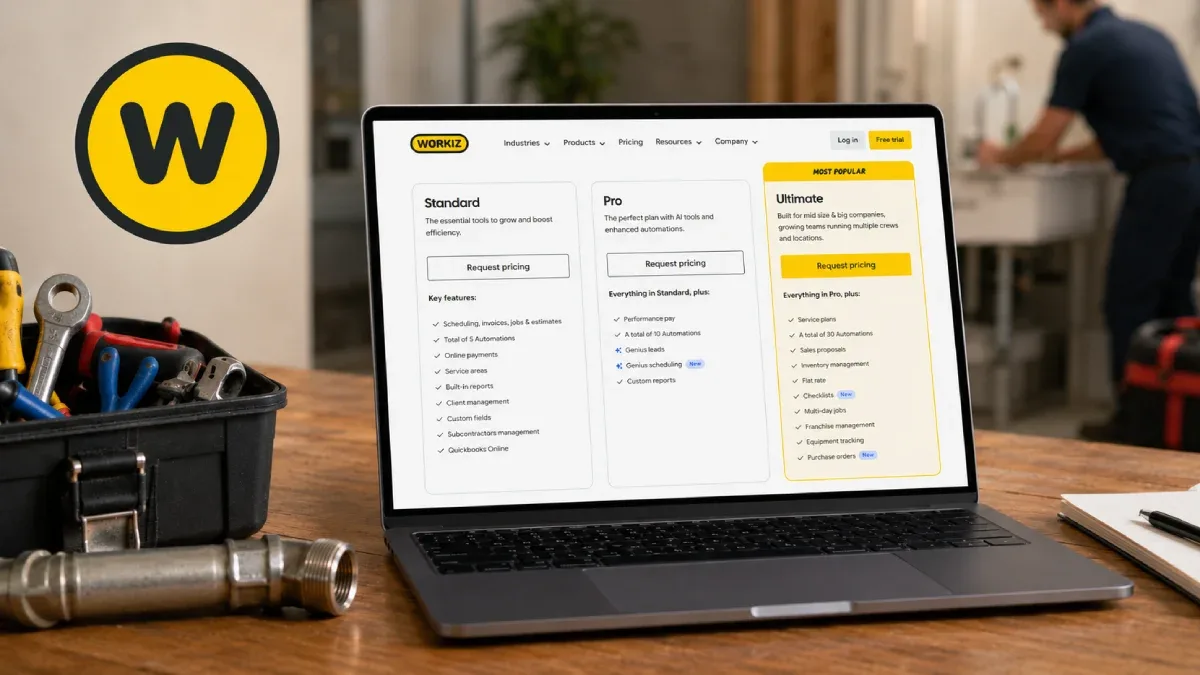
Workiz presents three main product tiers:
Standard — entry-level tools for small service businesses
Pro — more operational capabilities for growing teams
Ultimate — the highest package, aimed at businesses that need broader automation, communication, and growth features.
Unlike a simple per-user plan where every feature is permanently included at one price, Workiz combines subscription access with usage-sensitive features and optional services. This can mean that the amount you pay is influenced by the products your team activates and how actively you use them.
That model can work well for a plumbing or electrical company that wants to start with essential workflows and add advanced capabilities later. However, it also means owners should examine the full cost—not just the base subscription—before committing.
What “usage-based billing” means in practice
Usage-based billing means that some costs may rise as your business uses more of a particular service. With field-service software, that can include items such as phone activity, text messaging, automation volume, payments, marketing tools, AI answering services, lead-related services, or advanced integrations.
Workiz’s product screens show several tools beyond its core job-management software, including built-in phone and messaging features, AI answering, AI lead capture, AI call insights, Genius Marketing, payment processing, consumer financing, equipment tracking, service plans, and QuickBooks connectivity.
The practical takeaway is simple:
Your Workiz bill can include a base subscription plus the cost of optional products or usage-driven services your business chooses to use.
For example, a solo electrician who mainly uses scheduling, estimates, invoices, and the mobile app may have a very different monthly cost from a plumbing company that runs call tracking, AI lead handling, automated customer messages, payment processing, marketing campaigns, and service plans.
Workiz plans at a glance
The screenshots show three primary plan levels: Standard, Pro, and Ultimate. The company positions the plans by operational maturity rather than just headcount.
Plan | Best for | Main focus |
Standard | Smaller plumbing and electrical businesses | Core scheduling, jobs, estimates, invoices, payments, and customer management |
Pro | Growing teams with more office and field coordination needs | More automations, operational controls, workflow tools, and performance features |
Ultimate | Established or scaling service companies | Higher automation capacity, expanded communication, marketing, lead, and growth tools |
The exact price shown to a business can vary based on the package, sales quote, billing arrangement, promotions, user requirements, and activated services. For that reason, contractors should request a written quote that separates the recurring platform price from any usage-based or add-on charges before signing.
Standard plan: core tools for smaller trade businesses
The Standard plan is Workiz’s entry-level tier. It is aimed at businesses that need a central place to manage customers, schedule jobs, dispatch technicians, send estimates, invoice customers, and take payments.
For a small plumbing company or electrical contractor, the basic operational value comes from replacing scattered tools—such as paper diaries, WhatsApp messages, spreadsheets, and standalone invoicing apps—with one field-service system.
Core Workiz features shown across its product navigation include:
Client CRM
Scheduling
Dispatching
Invoicing
Estimates and proposals
Inventory management
Online booking
Mobile app
Advanced reporting.
A one- or two-person trade business may not need every advanced module immediately. The key question is whether the base workflow saves enough administrative time to justify the monthly fee.
When Standard makes sense
Standard may be a sensible starting point if you:
Run a small plumbing or electrical business
Need professional estimates and invoices
Want jobs and customer history in one place
Need mobile access for technicians
Are moving away from manual scheduling
Do not yet depend on heavy automation or advanced lead handling
However, if your office is already struggling with missed calls, quote follow-ups, technician coordination, or recurring service contracts, you may outgrow the entry level quickly.
Pro plan: for teams managing more work
The Pro plan is designed for businesses that need more than basic job management. Workiz positions its higher tiers around improving operational efficiency, helping teams handle more work without creating more office admin.
For plumbers and electricians, Pro-level functionality can be valuable when multiple technicians, dispatchers, or office staff need to work from the same system. At this stage, the business may be managing recurring service, more complex quotes, inventory, multi-step job workflows, customer communications, and follow-up processes.
The product navigation highlights several tools that are particularly relevant to growing teams:
Automations
Lead-source integrations
Service plans
Equipment tracking
Price Book
Reserve with Google
Checklists
Purchase orders
Expense management
Branded client portal.
A plumbing company might use service plans and automated reminders to manage annual maintenance work. An electrical contractor could use checklists, equipment tracking, and detailed estimates to standardize job quality across several technicians.
Why Pro can increase total cost
The Pro tier itself may cost more than Standard, but the more important factor is feature adoption. A company that activates more automations, messaging, lead tools, payment tools, or communications products should ask how each one is billed.
Before upgrading, ask Workiz these questions:
Is the plan price fixed per month, per user, per technician, or based on another measure?
Are text messages, calls, call recordings, or AI answering billed separately?
Are automations capped by plan or charged when usage rises?
Are payment-processing fees separate from the software subscription?
Are add-ons billed monthly, by usage, or through custom pricing?
What happens when you exceed included limits?
A clear written answer to those questions is more useful than relying on a promotional “starting at” price.
Ultimate plan: automation, communication, and growth tools
Ultimate is Workiz’s top public tier and is positioned for businesses that want more capacity to automate operations and grow revenue. The pricing comparison screenshot indicates that automation allowances scale by plan, with Standard showing fewer workflows, Pro showing more, and Ultimate showing the largest allocation.
For a larger plumbing or electrical company, Ultimate can make sense when your business needs to operate more like a coordinated service organization than a small field crew. That may include multiple call handlers, dispatchers, technicians, service plans, marketing workflows, and reporting requirements.
Ultimate-tier value is likely strongest for businesses that will actually use:
More automations
AI-driven communication tools
Call-related features
Marketing and lead tools
Expanded reporting
Payment and financing options
Larger-scale client communications
More advanced management workflows.
The risk is paying for capability you do not use. A five-tech electrical business may benefit more from a focused Pro setup than an Ultimate bundle with multiple unused products. Conversely, a fast-growing plumbing company that loses leads after hours may find AI answering and communication tools commercially valuable if they consistently turn missed calls into booked jobs.
The Workiz features that can affect your final bill
Workiz’s feature menu gives a useful view of where a business could incur additional cost or usage-dependent charges. Not every item will necessarily cost extra, but each is worth clarifying during a sales call.
Communications and AI
Workiz lists several communication-focused products:
Built-in phone and messages
AI answering
AI lead capture
AI call insights
Call recordings and tags
Ad and source tracking
Genius Marketing.
These can help a plumbing business respond quickly to urgent calls or help an electrical company track which advertising channels generate real jobs. But because they involve calls, messages, recordings, AI processing, or marketing activity, these are the categories most likely to have usage limits, separate pricing, or a custom quote.
Payments and financial services
Workiz also promotes:
Payment processing
Expense management
Consumer financing
Workiz expense card
Purchase orders
QuickBooks integration.
Payment processing usually comes with transaction fees, which are separate from the software subscription. Even if the rate is competitive, a contractor should calculate it based on annual card revenue—not just on a single month.
For instance, a plumbing company processing $30,000 per month in cards should compare the total processing cost, payout timing, accounting workflow, and customer-payment experience before deciding whether to use the platform’s payments product.
Operations and automation
Operational tools shown in the screenshots include:
Automations
Service plans
Equipment tracking
Price Book
Checklists
Inventory management
Online booking
Advanced reporting.
These are often the features that determine whether a trade business can run more jobs without adding office staff. But they may also lead a company toward a higher tier or more paid services. Use them deliberately: activate the features that solve a measurable bottleneck, then review their return after 60 to 90 days.
Example: how costs can grow for a plumbing company
Consider a fictional plumbing business with four technicians, one dispatcher, and steady inbound calls.
At the beginning, it may only need:
Job scheduling
Dispatching
Quotes
Invoices
The mobile app
Basic payments
That business might start with a lower plan or a limited setup.
As it grows, it could add:
Automated appointment reminders
Quote follow-ups
Service plans for drain cleaning or maintenance
Call recording
Lead-source tracking
AI answering for after-hours calls
Inventory management
QuickBooks connection
More advanced reporting
At that point, the cost no longer comes only from the base plan. The owner must evaluate whether additional bookings, faster payments, fewer missed calls, and reduced office workload are producing a worthwhile return.
The same model applies to electrical businesses. A company running estimates for panel upgrades, EV charger installations, generator projects, or recurring commercial work may benefit from deeper quoting, job tracking, checklists, and reporting—but should still check every line item on its invoice.
Is Workiz a good value for plumbers?
Workiz can be a strong fit for plumbing businesses that need a modern customer and operations platform, especially when lead response speed, dispatching, estimates, and payment collection are important.
It may be particularly useful if your plumbing company needs:
Faster call and lead handling
Better technician scheduling and dispatch
Branded estimates and online approvals
Automated customer reminders
Service-plan management
Payment processing and financing options
Reporting on lead sources and business performance
The strongest value usually comes when the software replaces multiple disconnected tools and helps the team book, complete, invoice, and follow up on more jobs without adding unnecessary admin.
Is Workiz a good value for electricians?
For electrical contractors, Workiz can be useful when you need to manage a mix of service calls, residential projects, commercial work, estimates, job documentation, inventory, and customer communication.
Electrical businesses should pay close attention to:
Price Book and estimating workflows
Job checklists and technician documentation
Equipment tracking
Purchase orders and expense management
Client history and communication logs
Job profitability and reporting
Integration with QuickBooks
For a broader look at software options built for electrical contractors, see our best electrical software guide.
Workiz vs Jobber: which pricing model is easier to predict?
If predictable monthly software costs are your priority, compare Workiz carefully with competitors before choosing. Workiz’s broader feature ecosystem can be attractive, but usage-sensitive services and add-ons mean you need to understand what is included and what could grow over time.
Jobber may be easier for some businesses to budget when the selected tier, included users, and add-ons are clear. Workiz may be more attractive for businesses that want deeper communication, AI, marketing, lead, and operational tools in the same ecosystem.
The right choice depends on your workflow:
Choose Workiz when | Consider Jobber when |
You want AI communication, phone, lead capture, and marketing capabilities in one platform | You want a simpler, more predictable FSM plan structure |
You have a high volume of inbound calls and need stronger lead handling | Your priority is scheduling, quoting, invoicing, and straightforward field workflows |
You will actively use automation, service plans, and advanced operational tools | You want to minimize the number of add-ons and usage-based services |
You can track the ROI of add-ons and communication products | You prefer a clearer fixed-cost budgeting model |
Read our full Jobber vs Workiz comparison before making a final decision.
Questions to ask before buying Workiz
Before you sign a Workiz contract, request a quote that answers these questions clearly:
What is the base monthly or annual subscription price?
How many users, technicians, office staff, or locations are included?
What is billed per user, per job, per message, per minute, or per automation?
Are AI answering and AI lead capture included, capped, or billed separately?
What fees apply to payment processing and consumer financing?
Are call tracking, recording, and SMS fees separate?
What happens if you exceed a plan’s automation or workflow limits?
Which add-ons are optional, and what are their monthly charges?
Is onboarding included or charged separately?
Is there a contract term, cancellation policy, or annual-payment requirement?
A reputable software vendor should be able to give you a transparent answer. If it cannot, budget conservatively and test the platform during the trial before moving your full operation over.
Bottom line
Workiz can be an effective platform for plumbers and electricians, especially for businesses that want CRM, dispatch, estimates, payments, automation, communications, and AI tools in a single system. However, its usage-based and add-on-driven structure means the advertised subscription may not be your complete cost.
Start by identifying the three operational problems you most need to solve—such as missed calls, delayed estimates, dispatch confusion, or late payments. Then choose the plan and add-ons that address those specific problems, track their impact, and avoid paying for an oversized bundle before your business is ready.
For more detail, read our Workiz review, compare Jobber vs Workiz, or explore our guide to the best electrical contractor software.